Get started
Learn how to easily install, upgrade or update D'fflib in your Salesforce environment, and what is needed to maximise framework benefits.
Adoption paths
To simplify this guide, we distinguish three scenarios for your Salesforce environment:
Fresh install (~5 min)
No (D')fflib installed yet, either on a fresh or existing project.
Migrate (~1 day)
Any fflib version is installed and you want to promote/migrate to D'fflib.
Upgrade (~30 min)
A D'fflib version is installed and you want to upgrade to a later version.
Distributions
Additionally, we distinguish three installation approaches:
D'fflib Recommended
One unlocked package, including fflib-apex-common, fflib-apex-mocks, and all D'fflib extensions.
Recommended as it improves the developer experience due to easy upgrade, reduced package-maintenance and no local dependency control.
D'fflib BYO (Bring Your Own fflib)
One org-dependent unlocked package with all D'fflib extensions.
Granting projects control of which fflib version is applied, including possible customisations.
Manual (optionally cherry-pick)
D'fflib classes are cloned/retrieved and added to the codebase, following projects' release process.
Full flexibility, control and responsibility over which parts of D'fflib are included.
Check the FAQ for more installation considerations like:
Why an unlocked package?
Why not multiple modular packages?
Am I restricted to D'fflib BYO when I have customised fflib?
Why are extended fflib classes included?
Installation guide
Based on your situation and preferred distribution, you can find the relevant guide:
| Your situation | D'fflib Recommended | D'fflib BYO | Manual |
|---|---|---|---|
| Fresh | 1. Fresh install (~5 min) | 1. Deploy fflib classes; 2. Fresh install | Repository |
| Migrate | 1. Migrate (~1 day) | 1. Check prerequisites; 2. Migrate | Repository |
| Upgrade | 1. Upgrade (~30 min) | Upgrade | Upgrade by applying changes |
Before deploying (D')fflib, it is essential to have a clear idea with regard to:
Application (~0-4 months)
Installing the package itself won't change code quality. You'll need to start absorbing and applying the patterns to realise the benefits.
Adoption (~0-2 weeks)
Regardless of the starting point, developers should be trained and enabled to ensure they can maximise the benefits of D'fflib, and thus ensure scalable and maintainable Salesforce features.
Fresh install
Install via the unlocked package installation link in the GitHub releases page.
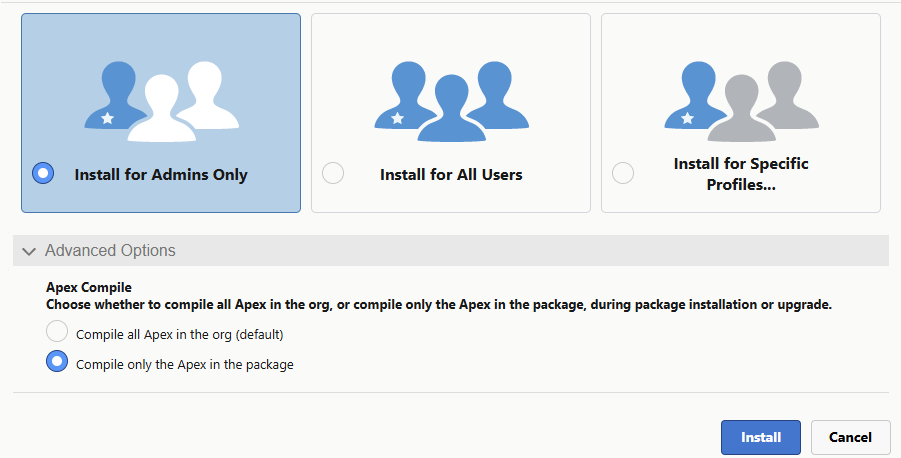
During installation, select the following options for the best experience:
- Install for Admins only
- Only compile classes of the package (in the advanced settings section)
    sf package install \
        --package <PACKAGE_ID_OR_ALIAS> \
        --target-org <ORG_ALIAS_OR_USERNAME> \
        --security-type AdminsOnly \
        --apex-compile package \
--wait 10Known edge cases
When the Contact Request object isn't available in the org, the package will fail. This is a standard object that should be available in all orgs. However, some older orgs might not have it enabled. The resolution is to raise a Salesforce support case to enable this object.
To reduce project dependencies all D'fflib database unit tests have been rewritten to less commonly configured objects:
ContactRequest and Solution. When your project has required fields, validation rules or automation to these objects,
the data insertion during unit test might fail, typically with REQUIRED_FIELD_MISSING or FIELD_CUSTOM_VALIDATION_EXCEPTION.
To avoid the need for Apex changes, it is possible to inject base records via Dfflib_Config__mdt:
- Create one
Dfflib_Config__mdtrecord and provide a JSON including the required field or to pass validation. - The unit test deserialises this JSON and clones it for every sample record. Leave a field blank to keep the framework default.
Note, only the first Dfflib_Config__mdt is used, so ensure there is always 0 or 1 record.
{
    "SolutionName": "SolutionName",
    "IsPublished": false,
    "Status": "Draft",
    "Your_Required_Field__c": "Sample value"
}{
"RequestDescription": "Unit test contact request",
"Your_Required_Field__c": "Sample value"
}<?xml version="1.0" encoding="UTF-8"?>
<CustomMetadata xmlns="http://soap.sforce.com/2006/04/metadata" xmlns:xsi="http://www.w3.org/2001/XMLSchema-instance" xmlns:xsd="http://www.w3.org/2001/XMLSchema">
<label>Default</label>
<protected>false</protected>
<values>
<field>Test_Solution_Sample_Record_Data__c</field>
<value xsi:type="xsd:string">{"SolutionName":"SolutionName","IsPublished":false,"Status":"Draft"}</value>
</values>
</CustomMetadata>Migrate from fflib
D'fflib is designed to be backward compatible, so migration from fflib should be relatively straightforward. Below are the recommended steps for a quick, easy and clear path towards a compiling environment. Adoption of D'fflib features in existing code is optional and can follow your own timelines, using the per-layer migration steps.
- Determine project customisations
Check your repository history or compare your classes withfflib-apex-commonandfflib-apex-mocksto identify customisations. Validate today's relevancy, like whether they can be superseded by D'fflib features. If still needed, document them in a customisation overview (class, reason and change), which every future upgrade relies on. - Check fflib dependencies D'fflib BYO
Make sure your version of fflib meets all BYO prerequisites. If not, manually add the missing variables and methods.
- Validate whether all Apex classes compile and unit tests pass. If not, resolve them, or document which fail.
- Follow above Fresh install steps in a separate or DEV sandbox.
- Check the known issues and apply code refactorings as needed (like adding
overrideto all Selectors).
- If you had customisations, retrieve the latest class version from the org, re-apply the customisation and deploy it to override. Make sure to add your customisations to your customisation overview and your deployment process.
Validate whether your enrichment could benefit others. If so, let us know.
- Compile all classes and run all unit tests.
- With the (full) D'fflib package, classes don't need to be part of your regular deployments and releases. Thus, the Application and
all
fflib_-prefixed classes can be removed from your repository. Don't add them to destructive changes, as the package still needs them. - For D'fflib BYO the classes should logically be kept in your repository.
Migrating Application class to metadata
Migration can be done per layer and class. Though with below anonymous apex script you can automatically create and deploy all
Dfflib_[layer]_Config__mdt metadata records.
// ================================ CONFIGURE ================================
Boolean dryRun = true;          // true: only debug the records, false: enqueue the deployment
String objectPrefix = '';       // optional prefix of the custom metadata object API names
Integer uowSortOrderStep = 10;  // SortOrder__c increment for the Unit of Work records

// Point to the factories of your application class, set one to null to skip it
fflib_Application.UnitOfWorkFactory sourceUnitOfWork = fflib.unitOfWork;
fflib_Application.SelectorFactory sourceSelector = fflib.selector;
fflib_Application.DomainFactory sourceDomain = fflib.domain;
fflib_Application.ServiceFactory sourceService = fflib.service;
// ===========================================================================

// Readers: a subclass may access the protected maps of the factories, so fflib_Application stays untouched
public class UnitOfWorkReader extends fflib_Application.UnitOfWorkFactory{
    public List<SObjectType> read( fflib_Application.UnitOfWorkFactory source ){ return source.m_objectTypes; }
}
public class SelectorReader extends fflib_Application.SelectorFactory{
    public Map<SObjectType, Type> read( fflib_Application.SelectorFactory source ){ return source.m_sObjectBySelectorType; }
}
public class DomainReader extends fflib_Application.DomainFactory{
    public Map<Object, Type> read( fflib_Application.DomainFactory source ){ return source.constructorTypeByObject; }
}
public class ServiceReader extends fflib_Application.ServiceFactory{
    public Map<Type, Type> read( fflib_Application.ServiceFactory source ){ return source.m_serviceInterfaceTypeByServiceImplType; }
}

// Builds valid custom metadata records and collects them in one deploy container
public class RecordBuilder{
    public Metadata.DeployContainer container = new Metadata.DeployContainer();
    public Integer recordCount = 0;
    private String objectPrefix;
    private Set<String> usedFullNames = new Set<String>();

    public RecordBuilder( String objectPrefix ){
        this.objectPrefix = objectPrefix == null ? '' : objectPrefix;
    }

    public void add( String typeName, String recordName, String label, Map<String, Object> valueByField ){
        String baseName = toDeveloperName( recordName );
        String developerName = baseName;
        Integer suffix = 2;
        while( usedFullNames.contains( typeName + '.' + developerName ) ){
            String suffixText = '_' + suffix++;
            developerName = baseName.left( 40 - suffixText.length() ).removeEnd( '_' ) + suffixText;
        }
        usedFullNames.add( typeName + '.' + developerName );

        Metadata.CustomMetadata record = new Metadata.CustomMetadata();
        record.fullName = objectPrefix + typeName + '.' + developerName;
        record.label = label.left( 40 );
        for( String field : valueByField.keySet() ){
            Metadata.CustomMetadataValue fieldValue = new Metadata.CustomMetadataValue();
            fieldValue.field = field;
            fieldValue.value = valueByField.get( field );
            record.values.add( fieldValue );
        }
        container.addMetadata( record );
        recordCount++;
        System.debug( '*** ' + record.fullName + ' [' + record.label + '] ' + valueByField );
    }

    // DeveloperName: max 40 chars, alphanumeric and underscores, starts with a letter, no double or trailing underscores
    private String toDeveloperName( String value ){
        String name = value.replaceAll( '[^A-Za-z0-9]+', '_' ).replaceAll( '^_+|_+$', '' );
        if( String.isBlank( name ) || !name.left( 1 ).isAlpha() ){
            name = 'X_' + name;
        }
        return name.left( 40 ).removeEnd( '_' );
    }
}

RecordBuilder builder = new RecordBuilder( objectPrefix );

// Domain entries
if( sourceDomain != null ){
    Map<Object, Type> domainMapping = new DomainReader().read( sourceDomain );
    for( Object key : domainMapping.keySet() ){
        if( !( key instanceof SObjectType ) ){
            System.debug( '*** Skipped domain ' + key + ': only SObjectType keys are supported by Dfflib_Domain_Config__mdt' );
            continue;
        }
        SObjectType objType = ( SObjectType ) key;
        String objTypeString = String.valueOf( objType );
        builder.add( 'Dfflib_Domain_Config', objTypeString, objType.getDescribe().getLabel(), new Map<String, Object>{
            'SObjectType__c' => objTypeString,
            'Implementation_Type__c' => domainMapping.get( key ).getName(),
            'Is_Trigger_Disabled__c' => false
        } );
    }
}

// Selector entries
if( sourceSelector != null ){
    Map<SObjectType, Type> selectorMapping = new SelectorReader().read( sourceSelector );
    for( SObjectType objType : selectorMapping.keySet() ){
        String objTypeString = String.valueOf( objType );
        builder.add( 'Dfflib_Selector_Config', objTypeString, objType.getDescribe().getLabel(), new Map<String, Object>{
            'SObjectType__c' => objTypeString,
            'Implementation_Type__c' => selectorMapping.get( objType ).getName()
        } );
    }
}

// Service entries, named after the interface as that is the lookup key
if( sourceService != null ){
    Map<Type, Type> serviceMapping = new ServiceReader().read( sourceService );
    for( Type interfaceType : serviceMapping.keySet() ){
        String interfaceName = interfaceType.getName();
        builder.add( 'Dfflib_Service_Config', interfaceName, interfaceName, new Map<String, Object>{
            'Interface_Type__c' => interfaceName,
            'Implementation_Type__c' => serviceMapping.get( interfaceType ).getName()
        } );
    }
}

// Unit of Work entries, keeping the order of the legacy list
if( sourceUnitOfWork != null ){
    List<SObjectType> uowTypes = new UnitOfWorkReader().read( sourceUnitOfWork );
    for( Integer i = 0; uowTypes != null && i < uowTypes.size(); i++ ){
        String objTypeString = String.valueOf( uowTypes[ i ] );
        builder.add( 'Dfflib_UOW_Config', objTypeString, uowTypes[ i ].getDescribe().getLabel(), new Map<String, Object>{
            'SObjectType__c' => objTypeString,
            'SortOrder__c' => Decimal.valueOf( ( i + 1 ) * uowSortOrderStep )
        } );
    }
}

if( builder.recordCount == 0 ){
    System.debug( '*** Nothing to deploy' );
} else if( dryRun ){
    System.debug( '*** Dry run: ' + builder.recordCount + ' records prepared, nothing deployed. Set dryRun = false to deploy.' );
} else{
    // No callback: an Anonymous Apex callback class makes the deployment fail with UNKNOWN_EXCEPTION
    Id jobId = Metadata.Operations.enqueueDeployment( builder.container, null );
    System.debug( '*** Deployment of ' + builder.recordCount + ' records enqueued, job Id: ' + jobId );
}- Layers can be migrated based on capacity and priorities to leverage D'fflib features.
- Check the Adoption guide for the recommended sequence of migrating layers.
Migration steps:
Start leveraging
- Check the next steps to learn more about application and adoption tips.
Known migration issues
Due to some breaking changes in Salesforce APIs, upgrading fflib to the latest API (e.g. by migrating to D'fflib) will likely cause compilation and runtime errors. Read how to best mitigate these, taking different urgencies and contexts into account.
Cause:
- All classes running API v67.0+ follow the new default sharing mode enforcement:
when the class omits to define a sharing mode, it will run
with sharing. - All Database operations running API v67.0+ follow the new default user mode: when no access mode is specified, it will run in user mode.
- Since all D'fflib classes run on the latest API version, this is immediately applied.
Consequence:
- fflib selector methods apply the default of the Selector class API version, as
Database.query()is called within that class. If you don't update the Selector class API version, there will be no change. - D'fflib selector methods run on API v67.0+, as the query is offloaded to the Database Proxy.
If you migrate, without defining a
Context, access or sharing mode, the new default will apply. - Database operations apply the default of the Unit of Work API version which for D'fflib is API v67.0+.
Thus enforcing sharing, CRUD and FLS permissions when no
Context, access or sharing mode is defined.
Options (in order of recommendation):
- Migrate code to D'fflib features and apply
dfflib_Database.Contextto always have an access and sharing mode defined. See Context enum for the possibilities. - Ensure all classes and database operations define an explicit access and sharing mode, like passing an
IDMLinstance to the Unit of Work. - To (temporarily) buy time and allow gradual technical debt mitigation:
retrieve the
dfflib_SObjectUnitOfWorkanddfflib_Database_Proxyclasses after installation, downgrade their API versions to v66.0 and override the D'fflib files via your deployment process.
Cause:
- Per API v65.0+ (Winter '26),
abstractandoverridemethods must be declaredpublic,protectedorglobal. If none is specified, the methods default toprivate, preventing the implementing class from accessing them.
Consequence:
- In
fflib_SObjectSelectorthegetSObjectType()andgetSObjectFieldList()methods did not have an explicit access modifier, thus, defaulting toprivate. To keep these methods available for Selectors, they were set topublicandprotected. - However, this made them available to all inheriting classes, which required the
overridekeyword to be used in the selector implementations.
Fix:
- Find-and-replace the methods to prepend the
overridekeyword.Schema.SObjectType getSObjectType() List<Schema.SObjectField> getSObjectFieldList()override Schema.SObjectType getSObjectType() override List<Schema.SObjectField> getSObjectFieldList()
Eliminate downtime:
Note, this can cause compilation errors/downtime in your Production org between the package installation (overriding framework code)
and the completion of your deployment (including the override changes). If this compilation-error window can't be
scheduled at an acceptable time:
- Retrieve the D'fflib code (
dfflib_SObjectSelectoror the full package) to your project repository - Deploy it together with the selector
overridechanges - Install the package
- Remove the D'fflib code from your project repository (no destructive changes)
This eliminates any downtime, maintains compilation continuity and ensures a smooth unlocked package installation.
BYO prerequisites
D'fflib BYO (Bring Your Own) is an org-dependent unlocked package. It relies on the fflib-apex-common and fflib-apex-mocks
classes to exist in your org, so it can't compile on its own and is only validated when installed in your org.
All referenced methods and classes must therefore be present.
Search your repository for the classes and signatures listed below.
- Anything you can't find means your copy predates that change and should be (manually) added. Update the affected classes from the upstream repository before installing D'fflib BYO, and be conscious to not override any local customisation.
- Given the sorting from new to old, it is likely all changes below the first match are included. Though this does depend on the maintenance and adoption of your codebase.
| Introduced | Classes and signatures introduced |
|---|---|
| Nov 2026 (#539) | Method fflib_SObjectDescribe.getNameField(Schema.SObjectType) |
| Sep 2026 (#536) | Exception fflib_Objects.InvalidValueException |
| Apr 2021 (#300) | Class fflib_IObjects, fflib_Objects, fflib_ISObjects, fflib_SObjects, fflib_IDomain |
| Apr 2017 (#34) | Class fflib_VerificationModeMethod: fflib_ApexMocks.calls(Integer), fflib_InOrder.verify(Object, fflib_VerificationMode) |
| Mar 2017 (#32) | Class fflib_InOrder |
| Feb 2017 (#28) | Method fflib_ApexMocks.mock(Type) |
| Jun 2016 (#23) | Class fflib_ArgumentCaptor |
| Feb 2016 (#11) | Class fflib_MatchException: fflib_ApexMocks.ApexMocksException |
| Nov 2014 (#2) | Method fflib_ApexMocks.doThrowWhen(Exception, Object) |
| Sep 2014 | Class fflib_ISObjectDomain |
| Jun 2014 | Class fflib_SObjectDescribe, fflib_SecurityUtils |
| May 2014 | Class fflib_ApexMocks, fflib_MethodReturnValue, fflib_IDGenerator |
Minimal subset for the #300 classes
While pull request #300 introduced more classes, these aren't referenced by D'fflib and therefore not mandatory.
For completeness of the functionality it is recommended to apply. Though if you have local customisations to
fflib_SObjectDomain, those don't need to be overwritten for D'fflib to compile and function.
Upgrade
Upgrading follows the same path as a migration, though shorter: the framework is already in place, so the focus is on breaking changes, your customisations and a validated roll-out.
Recap
- Check which D'fflib version you have installed (
Setup > Installed Packages). - List your projects' known customisations of (D')fflib classes.
Review Release Notes
- Review the release notes of every version between your current and the target version.
- For breaking changes, determine impact on your implementation
- For new features, consider whether you might benefit, and plan the migration effort.
- For API version updates, check the known migration issues.
Review checksum
- At the bottom of the release notes you can find the checksum to list all files changed in that release.
- For project customisations, check whether still relevant and overrides are needed.
- For manual distribution, determine per
fflib-apex-commonandfflib-apex-mocksfile change whether you'd like to adopt. - For BYO distribution, review the prerequisites table to validate whether new prerequisites require adoption.
- Validate whether all Apex classes compile and unit tests pass. If not, resolve them, or document which fail.
- Follow above Fresh install steps in a separate or DEV sandbox to update to a newer D'fflib version.
- Installing the package overwrites your customisations. Retrieve the new class version from the org, re-apply the customisation and deploy it to override.
- Never redeploy the previous customised file: it can revert the changes of the new release and cause compilation errors.
- A minor change is needed to force a delta for your CI/CD to enforce your customisations.
Validate whether your enrichment could benefit others. If so, let us know.
- Compile all classes and run all unit tests.
- Adopt the new features identified in step 1, based on capacity and priorities.
Next steps
Application (~0-4 months)
Installing the package itself won't change code quality. You'll need to start absorbing and applying the patterns to realise the benefits. Read more on a suggested and phased approach.
Adoption (~0-2 weeks)
Regardless of the starting point, developers should be trained and enabled to ensure they can maximise the benefits of D'fflib, and thus ensure scalable and maintainable Salesforce features.
Implementation support
Questions or support needed for installation, adoption or application? Like understanding how you can maximise the framework benefits?
Framework requests
Spotted a bug, have a question or want to request a feature? Log an issue in the GitHub repository.
Frequently Asked Questions
Questions on installation, relevancy and applicability for your project.
AI-assisted development
- AI code assistants can read this documentation website directly. To give them the most accurate D'fflib context,
we generate:
llms.txtandllms-full.txt.
AI Skill delayed
A dedicated (D')fflib AI Skill is being prepared, to recommend and apply the best fitting layer, help with adopting D'fflib features and refactor legacy code. Unfortunately, stress-testing and validation is consuming more time than planned. Expected by end of November.