Introduction
For maintenance teams, the value of a release is measured less by the number of new screens than by whether planning, execution and repair become easier to connect. The selected asset-management updates in SAP S/4HANA 2025 FPS02 span all three. Some extend the work users can do in existing apps, others introduce best practices for refurbishment processes or signal that it is time to move away from older apps.

New EAM AI agents: Providing insights and process execution support
The FPS02 update comes with a bunch of new agents that can help make the process more efficient but also focuses on capturing more details. It is interesting to note that SAP explicitly keeps a human in the loop to ensure correct execution of the process. The agents are currently available through Early Adopter Care (EAC) but will be rolled out wider in Q4 2026 and Q1 2027.
-
Maintenance request initiation agent: Turns a technician’s description into a structured maintenance notification, suggests relevant equipment and failure details, checks for duplicates, and can create an emergency order after confirmation.
-
Operational maintenance order planning agent: Creates orders from notifications or from scratch, recommends similar reference orders, checks readiness and scheduling constraints, and prompts planners to link orders to maintenance events.
-
Maintenance event planning agent: Groups and assigns orders and notifications to maintenance events, highlights blockers and unassigned work, and supports conversational event planning.
-
Maintenance job debrief agent: Converts notes, photos, or descriptions into structured job confirmations, records time and materials, and prepares a feedback email draft for technician review.
-
Equipment insights agent: Consolidates equipment data, maintenance history, reliability indicators, and costs into an asset overview with recommendations.
-
Maintenance task list agent: Extracts maintenance tasks from equipment manuals, drafts or updates task lists for approval, and helps avoid duplicates when manuals or equipment change.
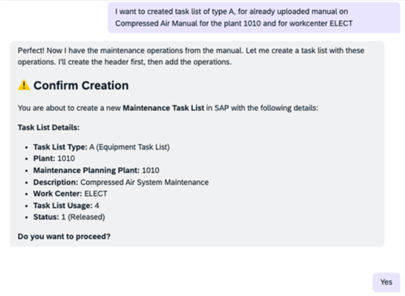
Example of maintenance task list agent creating a task list
Manage Maintenance Orders becomes a richer planning and execution app
A maintenance order is where many decisions meet: what work must happen, which materials and services are needed and how activities depend on one another. In FPS02, Manage Maintenance Orders (F5241) gains features across each of those areas. The result is a more useful working environment for planners handling orders that extend beyond current limits.
The app now allows for using Harmonized Document Management, replacing the previous Attachments button with an Attachments tab on the order header and on individual operations, suboperations, components and lean services. Users can upload documents and web links, preview or download files, and manage attachment details. At the order detail page, a read-only view brings together attachments associated with related objects including functional locations and notifications. Customers must make the specified configuration settings to use the attachment functionality.
Other changes make the app more capable as a planning workspace. Users can edit an order’s long text from the list view and maintain its header address. Furthermore, relationships between operations can now be managed. It also allows for navigating to Manage Maintenance Order Relationships that provides a graphical view when they need to examine those relationships more closely.
The release also adds capabilities for billable maintenance orders, including conversion of an existing maintenance order to a billable one. This is a big improvement compared to the current options in standard where multiple steps manual were required to make it billable. It’s good to see that SAP is investing in adding functionality to the Advanced Execution scenario where the service order and maintenance order integrate.
Perform Maintenance Jobs puts more information in technicians’ hands
The FPS02 enhancements to Perform Maintenance Jobs (F5104A) address a question technicians face every day: can they find the right job, understand its requirements and record what actually happened without losing context?
One addition concerns production resources and tools. With the relevant settings in place, technicians can add or modify these resources while processing a job and record their usage values. The information is then updated on the corresponding maintenance-order operation. That gives planners and reviewers a better view of the resources used during execution. In addition, technicians can see more of the measurement information needed to interpret and document their work. Measurement views include target values, permitted ranges and links to measurement documents. This increases insights in what happened before working on the job itself. At last, a new Forms tab also allows users to view and create SAP Dynamic Forms associated with the job. This can support capturing and management of (form-based) information on the job and digitalize the information in general.
The common thread is better information at the point of execution: faster job identification, clearer readings and a fuller record of work performed. These improvements may be particularly useful for utilities maintaining assets across many locations and manufacturers whose technicians need to document equipment-intensive maintenance consistently.
Maintenance notifications now link with billable execution - new way of working
A maintenance notification can hold the detail that explains why work is needed: failure codes, documented activities, root-cause information and data used for planning. FPS02 creates a more direct connection between that record and the work carried out through service execution.
Customers can now assign a maintenance notification to an execution order item. Once assigned, it becomes a service-relevant maintenance notification, appears in the related service order and is transferred automatically to a billable maintenance order created from that item. If an existing maintenance order is converted into a billable maintenance order, notifications attached at its header or in its object list are assigned to the corresponding execution order item.
Users of transactions IW22 and IW23 can see a new Service tab containing the related service transaction and item, provided the tab is activated in configuration. The broader benefit is that the original maintenance context can remain connected to service execution and billing, rather than being separated from the order that resolves the issue. This may be especially valuable to industrial equipment service providers and facilities-management organizations handling customer-billable repairs.
New scope items 85R & 85U for refurbishment processes
When a valuable spare part fails, replacement is not always the only sensible option. Some components can be repaired and used again, but that decision creates a process challenge: the organization must withdraw the defective part, plan the work, account for repair costs and return the component to usable stock. FPS02 introduces Internal Refurbishment and Repair of Components (85R) as a scope item covering that route. In addition, there is also External Refurbishment and Repair of Components (85U) as new scope item that supports the corresponding vendor-led process. It is good that SAP now has now officially added scope items for these processes which can support as a baseline for new S/4 HANA implementations or when clients want to use new processes in addition to their existing processes. These scope items are also on the roadmap for Public Cloud.
The process centers around the refurbishment order. It is used to plan internal or external repair activities and track their costs. The defective component is withdrawn, repaired by the organization and returned to stock for reuse; refurbishment costs are reflected in the material’s valuation. That gives maintenance and inventory teams a more structured way to handle a repairable component than treating it as a discarded part followed by an unrelated stock receipt.
Rail operators are one possible application, particularly where repairable fleet components rotate between service and stock. Energy companies may see similar relevance for high-value equipment parts maintained by in-house specialists or external parties. In both cases, the distinguishing point of the new scope items is that the repair is performed internally/externally and the refurbished component returns to inventory through a tracked process.
Replacing existing maintenance related app
There are a number of apps that will be deprecated so it’s useful to check for ongoing implementations of running business to see if apps are used and what enhancements may apply. Planning accordingly greatly benefits business continuity.
SAP has deprecated Find Maintenance Items (F3621) and recommends Manage Maintenance Items (F5356) as its successor. The older app may cease to appear by default in the SAP Fiori launchpad and is scheduled for deletion in an upcoming release. At some point it will be removed in the app finder. Find Maintenance Plans (F3622) is also deprecated. SAP recommends moving to Manage Maintenance Plans (F5325) before the older app is removed at some point. Updating user access, update work instructions and daily routines ahead of removal will smoothen the transition.
Furthermore, SAP is deprecating Manage Maintenance Planning Buckets (Old Version) (F3888) in favor of Manage Maintenance Planning Buckets (New Version) (F3888A). The newer app offers design and functional enhancements, but moving between the two is not seamless for every existing bucket. Buckets created in F3888 remain visible in F3888A. Users can inspect their details and backlog and edit their descriptions. Other actions—including viewing or changing scope, changing status and rescheduling—are available only for buckets created in the new app. Customers therefore need to separate buckets they merely need to consult from those they still expect to manage actively. SAP also provides a way to stop the old app generating operational planning buckets: set Number of Buckets in advance to zero in the corresponding reference planning buckets.
At last, Display Material Serial Number (F5147) is deprecated and due to be removed from the SAP Fiori launchpad in an upcoming release as it is replaced by Manage Material Serial Number (F7617).
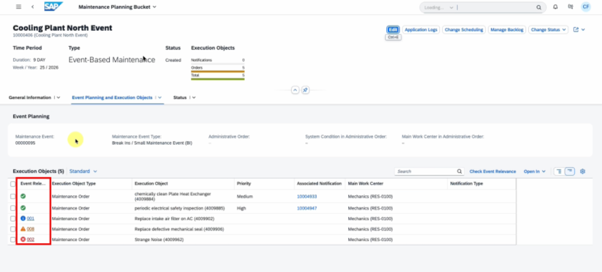
Impression of new maintenance planning bucket Fiori app functionality
Ready to make the most of the new release?
As maintenance processes continue to evolve, we are committed to helping you stay ahead with the right tools and guidance. Whether you are exploring new capabilities or planning your next steps, we are ready to support you in designing and enabling a more efficient and intelligent SAP EAM landscape.
In the Netherlands we have a team dedicated to designing and implementing SAP EAM solution for our clients. Are you planning to move to S/4 HANA Public Cloud or want to upgrade your (EAM) landscape further with new SAP EAM solutions?