



Intro
SAP S/4HANA Cloud 2608 introduces major enhancements to Asset Management, all designed to streamline maintenance operations and making the of life end users easier by reducing the amount of switches required between apps. These updates focus on making maintenance workflows faster and more transparent. In addition to this clear focus, there are more generic improvements that are worth mentioning as well.
Asset management EAM highlights
Flexible Workflow for Permit to Work Organizations can now define rule-based, multi-step approval workflows for work permits. Instead of manual ad-hoc approvals, supervisors and safety officers can establish standardized processes with individual or team approvers increasing automation. There is also a dynamic component that lets you define the flow by permit type or other parameters while extensive logging remains intact. Companies can benefit from this from a safety and compliance perspective as work can only start after the proper authorization which prevents unsafe operations and violation of regulations. This can be useful in any sector with strict safety regulations like Oil & Gas, manufacturing and utilities.
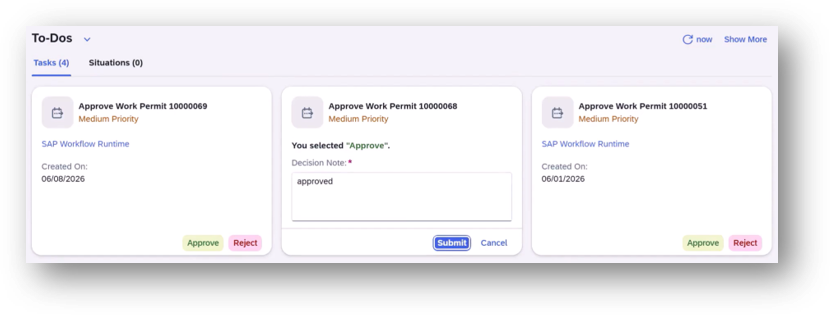
Flexible workflow for Permit to Work
Dispatch Maintenance Operations Directly For dispatching of operations there were already options but these are getting extended with the “Find Maintenance Order“ and “Change Maintenance Order” apps. This makes working more efficient as it eliminates the need to switch between different apps when aiming to dispatch one or more operations. This combines nicely with the new Permit tab that will be discussed in more detail later in this article. Quick dispatching is useful as it saves time but it also increases the response time in case of changing priorities or when capacity becomes available. With this improvement, the supervisors can manage their (large) maintenance in any industry better and save time.
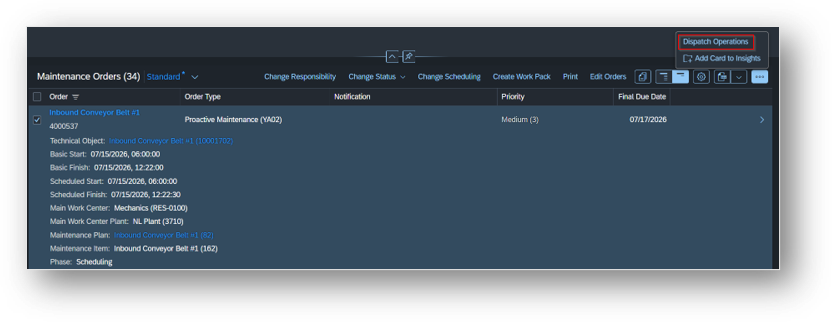
Maintenance Operations
Display Permit Details in Maintenance Orders A new tab in maintenance order apps Change Maintenance Order, Display Maintenance Order and Manage Maintenance Notifications and Orders has been added which shows all assigned permit details. This allows planners to verify required permits before assigning work. It makes it easier to coordinate as well with relevant data closer by in the app itself which prevents the need to switch to different applications. Having this data can also reduce the number of operations dispatched while not having a permit in place which can result in delays. This functionality is useful for any company that requires work permits as part of their processes.
View Maintenance Plans & create emergency/minor work from Asset Overview Maintenance planners and supervisors can now see all maintenance plans and items linked to a specific asset (equipment or functional location) directly from the Asset Overview app. This includes detailed information including status, priority, and assigned work center. Having this information provides a more holistic view of an asset which makes potential planning adjustments easier but can also support in solving maintenance gaps. This can especially be useful in asset intensive industries where a lot of maintenance is performed and consolidation of (planned) maintenance can consume quite some time. In addition, it is now also possible to create maintenance notifications for emergency or minor work directly from the Asset Overview app, with the notification automatically being linked to the selected asset. This eliminates the need to navigate to a separate app and manually enter asset details. If the structure of technical objects is properly maintained, it can increase ease of creation and response time which ultimately can reduce the amount of downtime. This is especially important in industries like utilities, manufacturing and transportation.
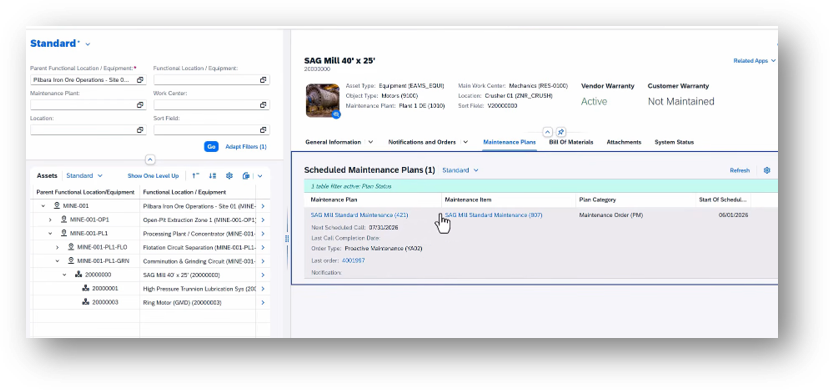
Example view of the new Asset Overview app
Generic (AI) Fiori updates and what’s ahead There are also more generic updates in the 2608 release that can benefit EAM. First of all, Fast with SAP Fiori has been added which provides a series of videos with tips on how to use Fiori. It is accessible from the help function on the Fiori Launchpad and can support (new) users in finding their way around different functionalities. It can also be useful for change management to reuse SAP content that is user friendly and provides a number of basics. In the AI corner, there are new features available that can increase efficiency. Users can now populate forms and table entries using natural language. Instead of manually clicking through fields, users simply describe what they want to enter (e.g., “Invoice for customer A, €5,000, due next month”), and generative AI automatically maps the text to the correct input fields. Users then review and confirm the matches before posting. The other addition is the AI-assisted fill of Fiori-element based applications. Users can now filter data in SAP Fiori applications using natural language instead of navigating complex filter menus. Simply describe what you’re looking for (e.g., “Show me all open invoices over €10,000 from Germany”), and the system automatically applies the correct filters. Looking forward, there are more AI agents on the way for EAM. There are multiple r agents that are being developed for asset management: • Functional Location Insights Agent: Consolidates information for a functional location on demand that would otherwise take more effort by checking multiple SAP transactions. • Maintenance Activity Insights Agent: Combines the end-to-end flow of a maintenance order into a single interface. • Maintenance Plan Cost Simulation Agent: Consolidates data from different sources to show planned, actual and project costs to support cost analysis and anomaly detection. • Maintenance request initiation agent: Supports maintenance request initiation and checks for failure patterns as well as duplicates. • Maintenance Request Screening Agent: Support ranking of notifications and detecting duplicates. It can also provide AI-generated summaries and recommendations. • Maintenance order planning agent: Supports planning by surfaces reference orders for creating new ones and recommends operations and work centers. It also supports materials and permit readiness checks before release. • Fix bin maintenance agent: Proposes optimal bin assignment and reassignment based on historical patterns, last movements and bin availability. This includes executing actions upon user confirmation. • Product Data Maintenance agent: AI agent for end-to-end product data maintenance that can create or update. With a multitude of input and validation options, this agent is useful for the lifecycle of Bill of Materials (BoM), material/product master data and Document Info Records (DIR). • There are more agents coming up in the future related to measuring points and mass changes of maintenance objects. Keep a close eye on the roadmap for Public Cloud.
Upgrading and evolving your landscape
As maintenance processes continue to evolve, we are committed to helping you stay ahead with the right tools and guidance. Whether you are exploring new capabilities or planning your next steps, we are ready to support you in designing and enabling a more efficient and intelligent SAP EAM landscape. In the Netherlands we have a team dedicated to designing and implementing SAP EAM solution for our clients. Are you planning to move to S/4 HANA Public Cloud or want to upgrade your (EAM) landscape further with new SAP EAM solutions?
Contact us

Davide Maas app

Jeremy Baars app